Open-source utilities I’ve built in Rust and Go to solve everyday operational and workflow headaches.
1. nettui — Native macOS Network TUI in Rust
GitHub: jdansak/OSX_network_TUI · Read the full project article →
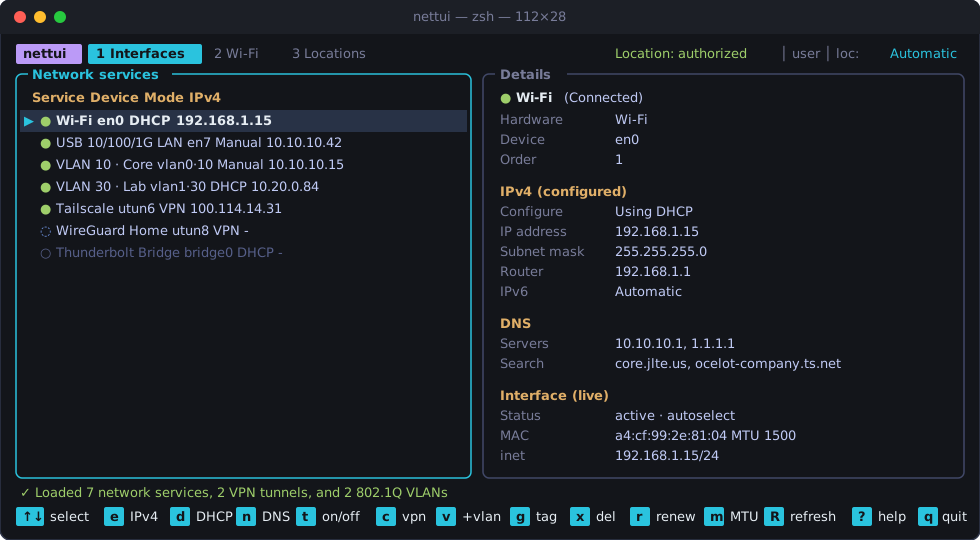
A native, compiled Rust terminal user interface (TUI) for inspecting, controlling, and configuring macOS network settings—wired interfaces, Wi-Fi connections, VPN tunnels, and 802.1Q VLANs—without clicking through nested System Settings panes.
Built with ratatui, Apple’s CoreWLAN and CoreLocation frameworks (via objc2), getifaddrs(3), /usr/sbin/networksetup, and /usr/sbin/scutil. Zero Python or shell scripts.
Key Capabilities
- Wired & Wireless Services (
1 Interfaces): Live link state, BSD device names (en0,en7,vlan0,utun*), interactive IPv4 modal (DHCP, Manual, Manual with DHCP Router), custom DNS & search domains, DHCP lease renewal, IPv6 toggle, and MTU tuning. - VPN Tunnel Control (
1 Interfaces): Integrates withscutil --ncto inspect and toggle Tailscale, WireGuard, IKEv2, L2TP, and IPSec tunnels directly from the keyboard (c). - 802.1Q VLAN Management (
1 Interfaces): Create (v), re-tag (g), and delete (x) virtual 802.1Q VLAN interfaces (1–4094) on any physical parent adapter. - Wi-Fi Telemetry & Scanner (
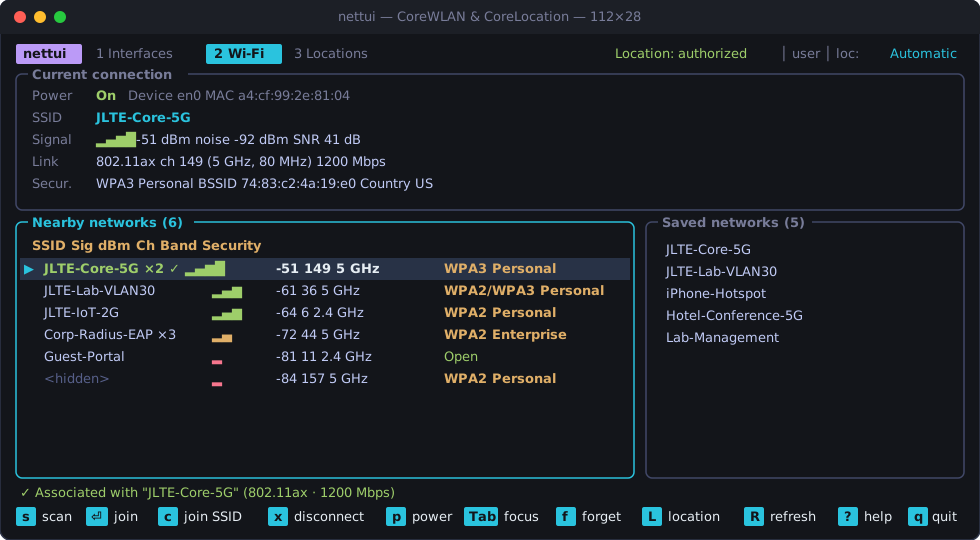
2 Wi-Fi): Live RSSI, noise floor, SNR, PHY mode (802.11ax), channel width/band, nearby AP scanner (s), and macOS Keychain network joining—using an embedded Mach-O__TEXT,__info_plistsection so macOS Sonoma/Sequoia grants CoreLocation access to unredacted SSIDs.
git clone https://github.com/jdansak/OSX_network_TUI.git
cd OSX_network_TUI
cargo build --release
./target/release/nettui
2. canvas-scraper — Canvas LMS Gradebook CLI & Web Dashboard (Go)
GitHub: jdansak/Canvas-Scraper · Latest Releases (macOS / Linux / Windows) · Read the full project article →
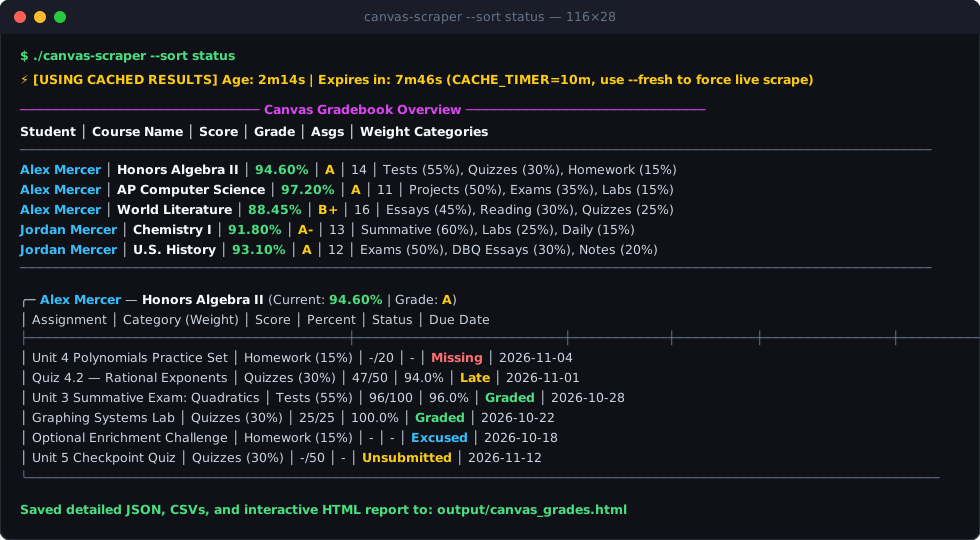
A standalone Go tool that extracts courses, overall grades, category weights (Tests 55%, Quizzes 30%, Homework 15%), and individual assignment submissions from any Canvas LMS instance (https://<school>.instructure.com). Built with first-class support for Parent / Observer accounts observing multiple students.
Key Capabilities
- Two-Tier Session & Data Caching: Authenticates once via headless Chrome (
chromedp—or--headedfor MFA/2FA), saves Playwright-compatible cookies tostorage_state.json, and executes subsequent fetches directly over Go’s native HTTP client with localCACHE_TIMERpersistence (.cache_raw.json). - Interactive Single-File HTML Dashboard (
--web): Generates a dependency-free HTML5 gradebook dashboard with automatic Light/Dark mode, grade badges, and per-course tables. - AI-Ready Markdown (
--markdown), CSV & JSON Exports: Producescanvas_grades.mdwith pre-extracted missing/late action items alongsidecourses_summary.csv,assignment_weights.csv,assignments_detail.csv, andcanvas_grades.json. - Instant Filtering & Sorting: Filter cached results in milliseconds by
--student,--course,--due-within 7d,--missing-days 2,--below 75,--min-weight 30, or--status missing,late, and sort bystatus,score,grade,date, orweight.
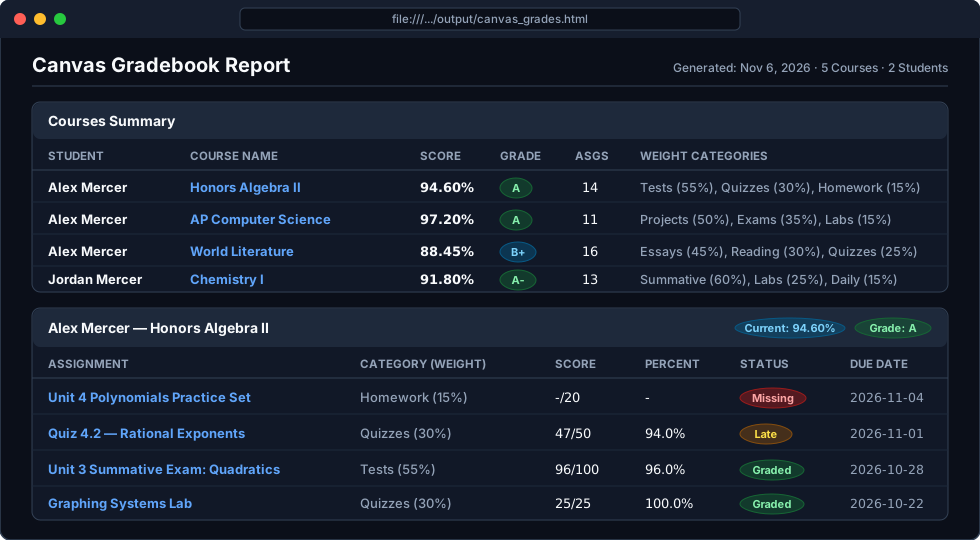
# Run with status urgency sorting and open the interactive web dashboard
./canvas-scraper --sort status --web

# Show only missing/overdue assignments or graded items below 75%
./canvas-scraper --missing-days 1
./canvas-scraper --below 75 --min-weight 30