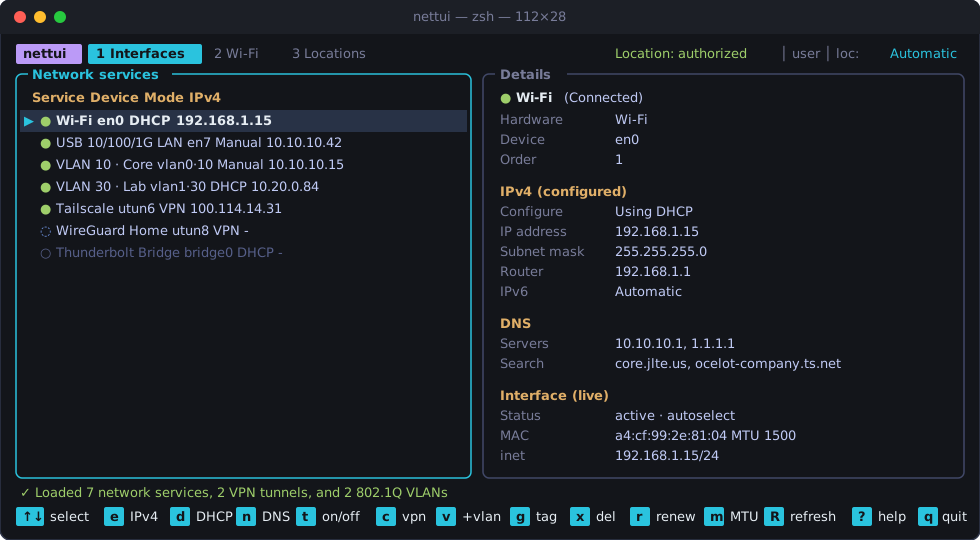
ever since Apple redesigned System Settings in macOS Ventura, doing basic network engineering tasks on a Mac—switching an Ethernet dongle between a static IP and DHCP, checking which utun interface belongs to which VPN, or spinning up an 802.1Q tagged VLAN interface to test a trunk port—means clicking through four layers of modal sheets.
On Linux, you have nmtui and impala. On macOS, you’re stuck running verbose /usr/sbin/networksetup and /usr/sbin/scutil commands by hand, and starting in macOS Sonoma, Apple even removed the classic airport CLI utility.
So I built nettui (OSX_network_TUI): a single, compiled Rust binary that puts all of macOS’s wired interfaces, Wi-Fi telemetry, VPN tunnels, 802.1Q VLANs, and Network Locations into a fast keyboard-driven terminal UI.

What nettui Does
nettui is organized into three tabs (1 Interfaces, 2 Wi-Fi, and 3 Locations), backed by an asynchronous worker thread so UI rendering stays locked at 60 fps even while scanning Wi-Fi channels or reconfiguring interfaces.
1. Wired & Wireless Interface Management (1 Interfaces)
- Unified Service & Live Interface View: Correlates high-level macOS network service names (
Wi-Fi,USB 10/100/1G LAN) with their underlying BSD devices (en0,en7,bridge0), priority order, hardware MAC address, active media speed/duplex, MTU, and livegetifaddrs(3)IPv4/IPv6 bindings. - Interactive IPv4 Modal (
e/Enter): Switch any interface between DHCP, Manual (IP, Subnet Mask, Router), or Manual with DHCP Router without typing a singlenetworksetupflag. - DNS & Search Domains (
n,s): Set custom resolvers (or clear them back to automatic DHCP), renew DHCP leases (r), toggle IPv6 (6), disable/enable hardware ports (t), and adjust MTU (m).
2. Native VPN Tunnel Discovery & Control (1 Interfaces)
- Queries
/usr/sbin/scutil --ncto list every configured VPN service on the system—including Tailscale, WireGuard, IKEv2, L2TP, and Cisco IPSec. - Shows live tunnel status (
Connected,Connecting,Disconnected), dynamically assignedutun*device names, and tunnel IPv4 addresses. - Pressing
c(orEnter) connects or disconnects the selected VPN tunnel immediately.
3. 802.1Q VLAN Creation & Tag Editing (1 Interfaces)
- When testing trunk ports or segmented lab networks (like my
COREVLAN 10 andLABVLAN 30 subnets),nettuilets you create virtual 802.1Q VLAN interfaces (v) on top of any physical Ethernet adapter, edit the VLAN tag (1–4094) or parent device (g), or tear the VLAN down (x).
Tab 2: Live Wi-Fi Telemetry & AP Scanning via CoreWLAN
Because Apple removed the legacy /System/Library/PrivateFrameworks/Apple80211.framework/.../airport binary in macOS 14.4, shell-wrapper TUIs broke overnight.
nettui links directly against Apple’s native CoreWLAN and CoreLocation Objective-C frameworks in Rust using objc2:
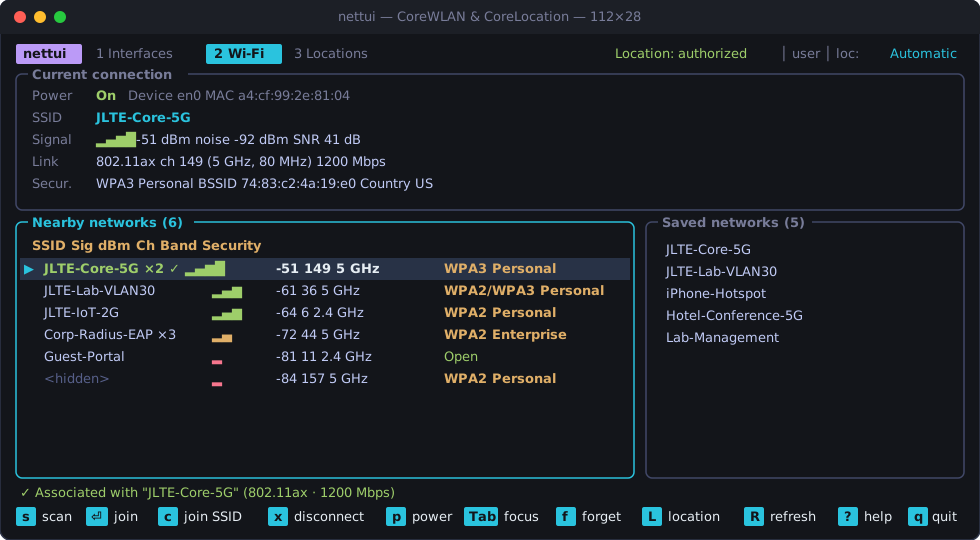
- Live Radio Metrics: Displays real-time RSSI (
-51 dBm), noise floor (-92 dBm), calculated SNR (41 dB), signal bars (▂▄▆█), active PHY mode (802.11ax/ Wi-Fi 6), channel number, band (2.4 GHz,5 GHz,6 GHz), channel width (80 MHz), transmit rate (1200 Mbps), and security mode (WPA3 Personal,WPA2 Enterprise, etc.). - Surrounding AP Scanner (
s): Performs a hardware scan, groups multiple BSSIDs advertising the same SSID (showing×2,×3AP counts), and sorts by signal strength. - Keychain Integration: Join scanned or hidden networks (
Enter/c), pulling saved credentials from the macOS System Keychain or prompting for a passphrase in-TUI, and manage or forget preferred networks (Tab/f).
Solving the macOS Sonoma/Sequoia SSID Redaction Problem in a CLI Binary
One of the trickiest macOS engineering details in nettui is how Apple handles Wi-Fi privacy on modern macOS releases.
Starting in macOS Sonoma, CWInterface::ssid() and CWNetwork::ssid() return nil (<redacted>) unless the calling process has been granted Location Services permission by the user. Normally, macOS only allows bundled .app applications (which have a Contents/Info.plist containing NSLocationUsageDescription) to request CoreLocation authorization.
How do you get macOS locationd to show a Location Services prompt for a standalone command-line binary in /usr/local/bin/nettui?
The answer lies in the Mach-O linker. In build.rs, nettui instructs clang / ld to embed Info.plist directly into the compiled binary’s __TEXT,__info_plist section and ad-hoc signs the executable with a stable bundle identifier (com.nettui.cli):
// build.rs — Embed Info.plist into __TEXT,__info_plist so CoreLocation works in a single binary
fn main() {
    println!("cargo:rerun-if-changed=Info.plist");
    println!("cargo:rustc-link-arg=-Wl,-sectcreate,__TEXT,__info_plist,Info.plist");
}
When you press L inside nettui (or run nettui --authorize-location), CoreLocation reads the embedded plist from the Mach-O header, triggers the native macOS permission dialog, and immediately unredacts all SSIDs and BSSIDs in the terminal.
Security & Privilege Escalation
- Zero Shell Execution: Every external system utility (
networksetup,scutil,ifconfig,ipconfig) is invoked directly viastd::process::Commandargument arrays—neversh -c—eliminating command injection even with hostile SSID names. - On-Demand
sudoModal: Read operations run completely unprivileged (user). When you apply a write operation (such as changing an IP address or creating a VLAN),nettuicheckssudo -n truefirst; if yoursudotimestamp has expired, it pops up an in-TUI password modal, validates credentials viasudo -S -v, and executes the change cleanly without dropping out of the alternate screen.
Headless CLI Flags & Building from Source
In addition to the interactive TUI, nettui includes non-interactive flags for quick terminal checks and scripts:
# Clone and build the release binary
git clone https://github.com/jdansak/OSX_network_TUI.git
cd OSX_network_TUI
cargo build --release

# Launch interactive TUI
./target/release/nettui

# Print a formatted status summary of all interfaces, Wi-Fi, and locations
./target/release/nettui --status

# Scan and print nearby Wi-Fi access points to stdout
./target/release/nettui --scan
The full source code is available on GitHub at jdansak/OSX_network_TUI.