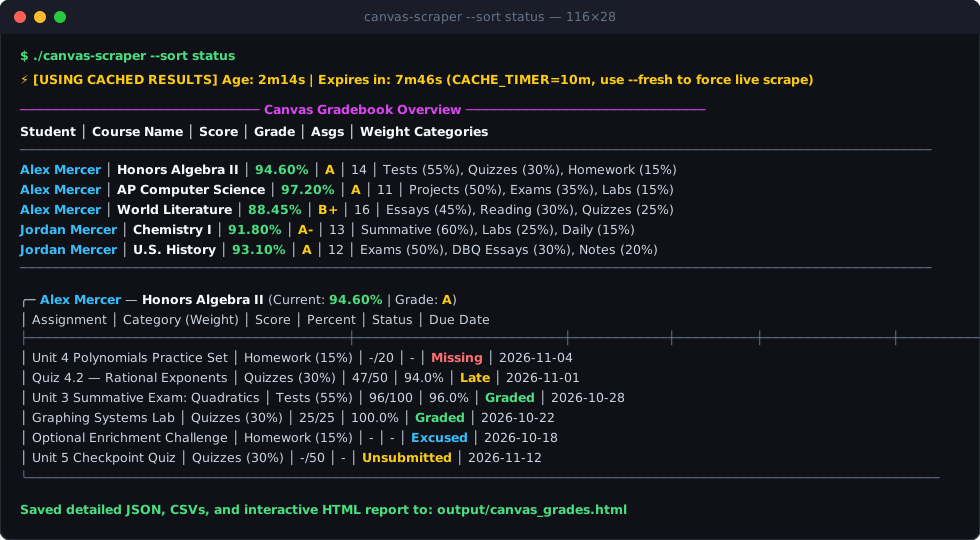
If you have kids in school using Canvas LMS (*.instructure.com), checking grades as a Parent / Observer through the web UI is surprisingly painful. To figure out why a grade moved—or whether an assignment is missing across two kids and twelve courses—you have to switch observed students in a dropdown, open each course one by one, click into the Grades tab, and mentally cross-reference category weights (Tests 55%, Quizzes 30%, Homework 15%).
I wanted a single command I could run from my terminal (or on a weekday cron job) that would pull every observed student’s courses, overall scores, assignment category weights, and submission statuses in seconds—and render them as both a colorized terminal table and a self-contained HTML dashboard.
That turned into canvas-scraper: a cross-platform Go binary with zero runtime dependencies.

Architecture: Two-Tier Authentication & Local Cache
Many school Canvas instances sit behind SSO login flows, SAML redirects, or MFA prompts where generating a personal Canvas API token in the UI is disabled for student/parent accounts. On the other hand, driving a full headless browser to click through twelve course pages on every run is slow and fragile.
canvas-scraper uses a two-tier hybrid approach:
┌────────────────────────────────────────────────────────────────────────┐
│                          Canvas Scraper (Go)                           │
└────────────────────────────────────────────────────────────────────────┘
          │                                              │
          ▼ (If session expired / fresh)                 ▼ (If session valid)
┌───────────────────────────┐                  ┌───────────────────────────┐
│ Headless Chrome (Chromedp)│                  │ Go HTTP Client (REST API) │
│  - Authenticates securely │                  │  - Fetches users/observees│
│  - Saves session cookies  │───────►──────────│  - Fetches courses/scores │
│    to storage_state.json  │                  │  - Fetches groups/submits │
└───────────────────────────┘                  └───────────────────────────┘
                                                             │
                                                             ▼
                                               ┌───────────────────────────┐
                                               │ Local Cache Envelope      │
                                               │  (.cache_raw.json)        │
                                               └───────────────────────────┘
- Session Persistence (
storage_state.json): On the very first run (or when cookies expire),canvas-scraperuseschromedpto complete the login flow and writes the session cookies tostorage_state.jsonin Playwright-compatible format. (If your school requires MFA/2FA, running./canvas-scraper --headedonce lets you approve the prompt in a visible window.) - Direct Go HTTP Client against
/api/v1/: Oncestorage_state.jsonexists, Chrome isn’t launched at all—the scraper attaches the session cookies to a native Gohttp.Clientand queries Canvas’s REST endpoints directly:- Discovers observed students via
/api/v1/users/self/observees. - Pulls active courses and current grading-period scores via
/api/v1/courses?enrollment_state=active&include[]=total_scores&include[]=current_grading_period_scores. - Joins assignment groups, category weights, and assignments in a single request per course (
/api/v1/courses/:id/assignment_groups?include[]=assignments) with polite jittered pacing (150–300ms) between courses.
- Discovers observed students via
- Instant Local Data Cache (
CACHE_TIMER): Raw API results are cached inoutput/.cache_raw.json(default10m, configurable to2h,7d, etc.). Any subsequent CLI filter or sort runs instantaneously against the local cache in under 10 milliseconds without touching Canvas servers.
Interactive Single-File HTML Dashboard (--web)
Passing --web generates output/canvas_grades.html and automatically opens it in your default browser:
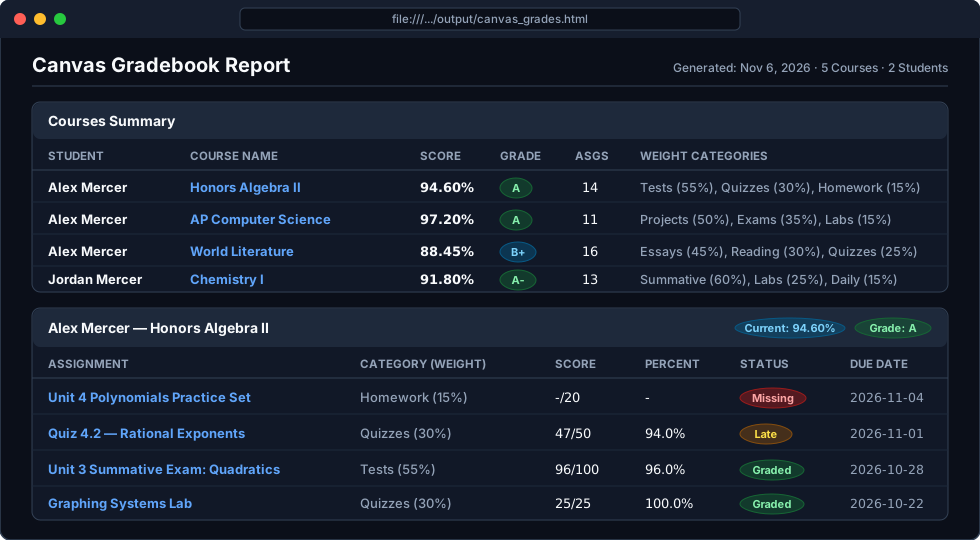
The generated HTML file has zero external CSS or JavaScript dependencies—everything is inlined so you can email it, drop it on a phone, or archive it:
- Automatic Light & Dark Mode via
prefers-color-scheme. - Courses Summary Table with color-coded grade badges (
Ain green,Bin cyan,Cin yellow,<70%in red) and inline category weight formulas. - Per-Course Assignment Cards with direct clickable links back to each assignment on Canvas, points earned/possible, percentage, category weight, and status badges (
Graded,Missing,Late,Excused,Unsubmitted).
Instant CLI Filtering & Sorting
Because filtering runs against the local cache envelope, you can slice the gradebook from the command line immediately:
# Sort assignments by urgency (Missing/Overdue -> Late -> Submitted -> Graded)
./canvas-scraper --sort status

# Filter to a specific student on a Parent/Observer account
./canvas-scraper --student Alex

# Show only assignments due in the next 7 days
./canvas-scraper --due-within 7d

# Investigate trouble spots: Missing work or graded items below 75% in major categories (>= 30% weight)
./canvas-scraper --missing-days 1
./canvas-scraper --below 75 --min-weight 30
AI-Ready Markdown (--markdown), CSV & JSON Deliverables
In addition to the terminal UI and HTML dashboard, canvas-scraper writes structured data files to output/:
canvas_grades.md(--markdown): A clean Markdown briefing containing an executive summary table, a pre-extracted Action Items section (all missing, overdue, or late assignments across all courses), and full course breakdowns—formatted so you can pipe it straight into a local LLM (glow output/canvas_grades.mdor an AI study-plan prompt).courses_summary.csv,assignment_weights.csv,assignments_detail.csv, andcanvas_grades.json: Ready for spreadsheet tracking or custom scripts.
Download or Build from Source
Pre-compiled binaries for macOS (Apple Silicon & Intel), Linux (amd64 & arm64), and Windows (.exe) are published automatically via GitHub Actions:
- GitHub Repository: jdansak/Canvas-Scraper
- Latest Release Binaries: github.com/jdansak/Canvas-Scraper/releases/latest